What is ArcAngel Academics?
It's the software that runs a school — the records, the grades, the attendance, the paperwork, the communication, and the money — built so that a single homeschooling family can use it on day one, and a school of five hundred can use the same system without changing tools.
Most school software is built for large institutions and then trimmed down for everyone else. This was built the other way around — and the price is published on the site, with every feature included in it.
The short version
One system that holds every record your school needs to keep, shows each person exactly what they should see and nothing more, and costs the same whether you use two features or forty. Every feature is included in every plan. There are no tiers to climb, no modules to unlock, and no sales call to find out the price.
What it does, for every level
One engine powers the entire system, to give each school the experience they deserve to give their children the best possible opportunities. We've designed this to be tailored for your school, by your school.
Students
What a student signs in to
- What's due — assignments by class, with due dates, so nothing is a surprise
- Their grades — scores as they're posted, and where the class average stands
- Their schedule — the day's classes, times, and any changes
- Messages from teachers — with a parent always able to see the thread
- Mark work done — where a school turns it on, students log their own progress
Parents & families
What a guardian signs in to
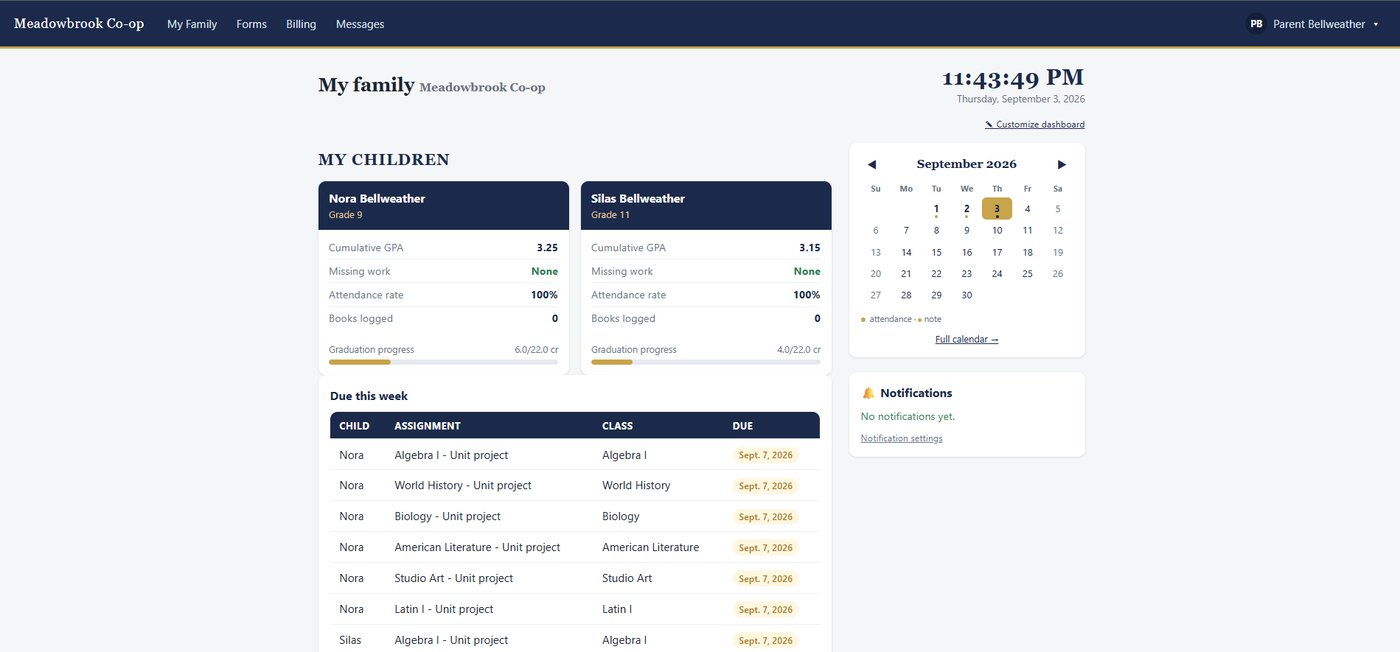
- Every child on one screen — GPA, attendance, missing work, credits toward graduation
- Forms, signed online — permission slips, medical intake, handbook sign-offs; no printing or scanning
- Tuition & invoices — see the balance, pay by card, get a receipt, or follow a payment plan
- Two-way messaging — talk with teachers about your child; you always see your child's threads
- Only your children — a parent can never see another family's students
Homeschool parent-educators
When one person is all of the above
- Every role at once — you're the principal, the teacher, and the parent, and the app doesn't make you pretend otherwise
- State compliance tracking — hours, days, and credits computed from what you already log
- Real transcripts & report cards — GPA, credits, and a transcript a college will accept, generated from your records, not retyped
- Co-op classes count — when your co-op uses ArcAngel too, a class taught there flows onto your child's transcript
- Nothing you don't need — the systems built for other kinds of schools don't interfere with your experience. You decide if and when they'd be useful to you, instead of having to work around them
Teachers
What a teacher signs in to
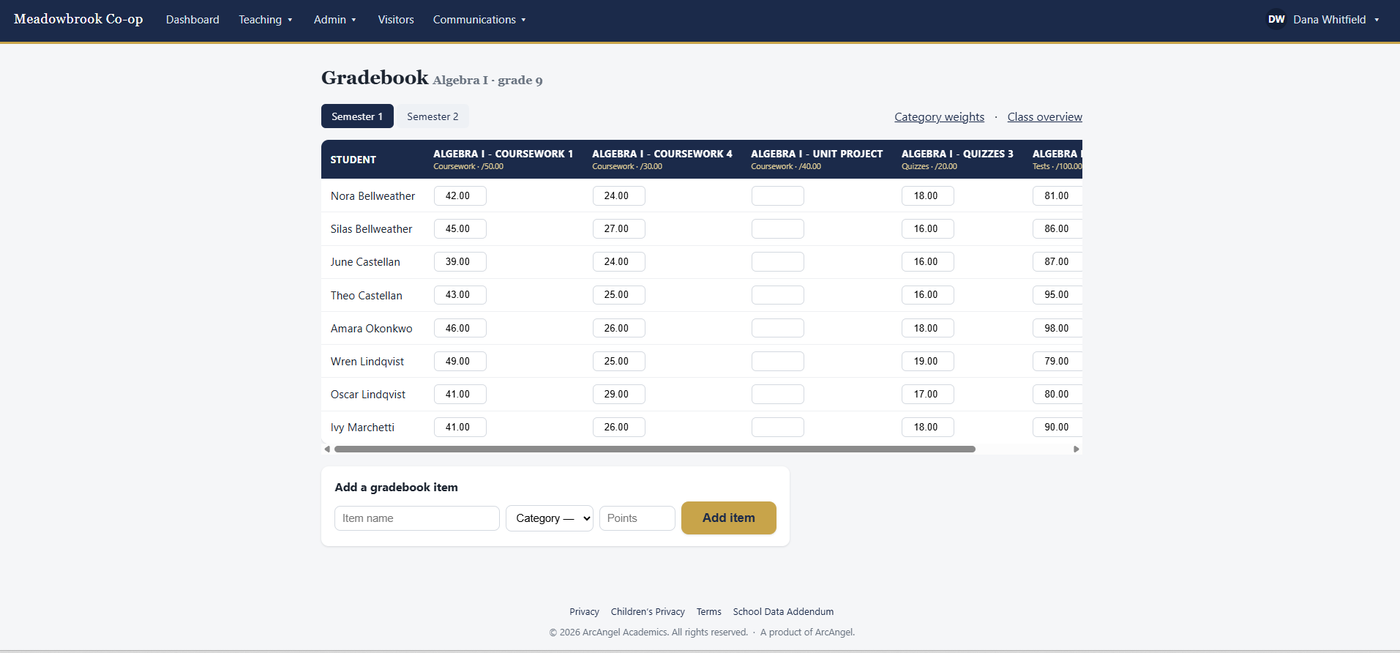
- A weighted gradebook — categories, weights, and per-course grading scales
- Attendance in one tap — mark a whole class present, then fix the exceptions
- Assignments & scheduling — post work with due dates and availability windows
- Notes on a student — staff-only, or shared with the family or student
- Reach families directly — an announcement to a class you teach or to one family, and two-way messages about a student
- Lesson plans — units and dated lessons, turned into graded work in one click and copied into next year
Co-ops & multi-family groups
When families and a school share students
- One login, two schools — switch between your family and the co-op you belong to
- Shared classes — the co-op teaches it, and when the family uses ArcAngel too, the grade lands on the family's own transcript
- The family stays in charge — the co-op is a service provider, not the owner of the record
- Group operations — enrollment, forms, visitor sign-in, and per-family billing
- Room to grow — add families as you gain them; the cost moves with your size, and nothing new has to be bought to unlock a feature
Administrators & directors
What the person running the school signs in to
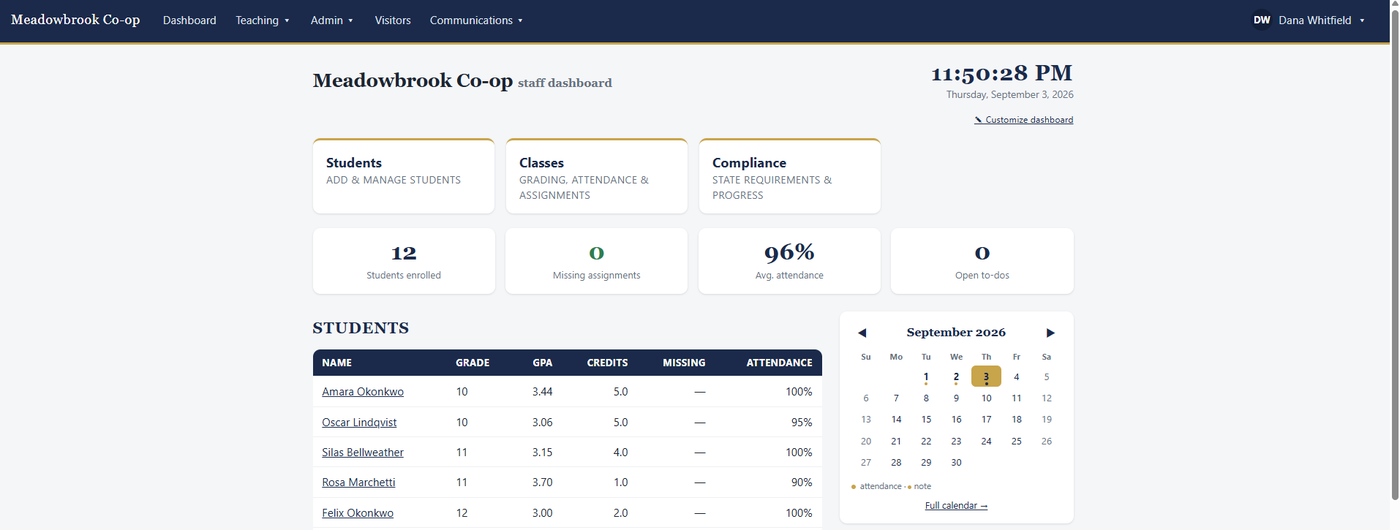
- The whole roster — enrollment, records, custom fields, documents, and history
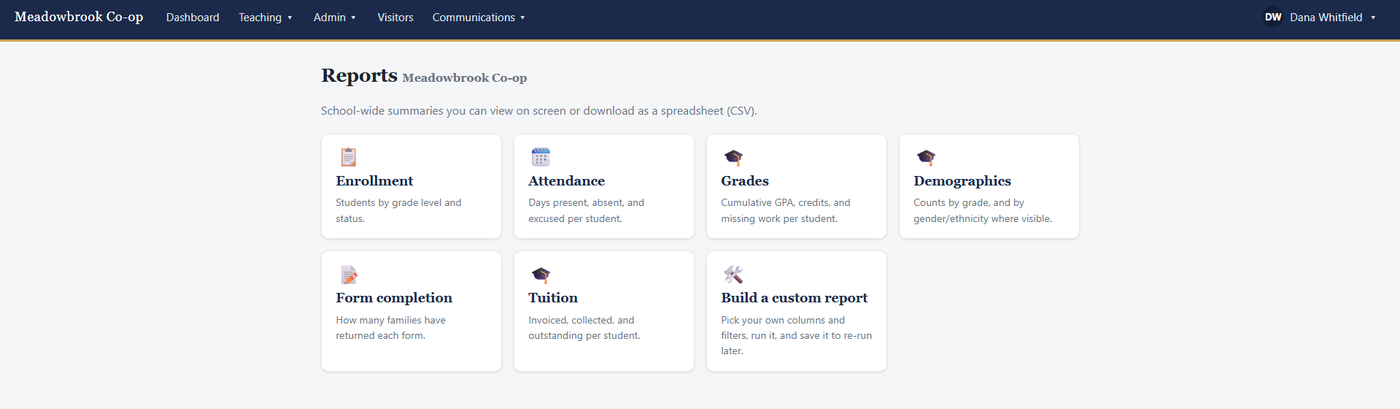
- Reports on everything — enrollment, attendance, grades, form completion, tuition, and demographics, on screen or as a spreadsheet, plus a builder for the report only your school needs
- Report cards & transcripts — generated from the grades you already keep, in your school's own branding, ready to print or send
- Admissions & re-enrollment — from a public application through accept, enroll, and next year's rollover
- Who can do what — roles for every job from registrar to bus driver, co-equal administrators, a view-only observer, and field-level visibility
- Two-step sign-in — required for every staff account, and optional or required for families, your choice
- Automations (beta) — rules that watch for absences, missing work, overdue forms, and overdue tuition, and act for you
- Billing families — invoices, payment plans, receipts, refunds, paid into your own account
Reporting: the paperwork, produced for you
You're already recording grades and attendance. Everything below is generated from those records — not typed a second time into a different document. A homeschool and a school answer to different people, so they get different reports; several are useful to both.
Homeschool reporting
What a parent-educator has to be able to show
- State compliance — instructional hours, days, and credits per subject, measured against your own state's requirements, with what's met and what's still short
- Attendance & hours — days and hours logged over any date range; because it's computed from what you already recorded, the number you report is the number you kept
- A real transcript — courses, credits, and GPA in the form a college or a state reviewer expects
- Report cards — per term, from the grades you already posted
- Grades & credits — GPA, credits earned, and progress toward the diploma you'll be signing
- Reading & book logs — what's been read, for a portfolio review or your own records
- Build your own — for whatever your state asks that nobody anticipated
School administration reporting
Answer a question about the whole school
- Enrollment — who's enrolled, by grade and status
- Attendance — present, absent, and excused per student, over any date range
- Grades — cumulative GPA, credits earned, and missing work per student
- Form completion — which families have returned each form, and who hasn't
- Tuition — invoiced, collected, and outstanding per student
- Demographics — counts by grade, and by gender or ethnicity only where the viewer is permitted to see it
- Compliance — the same per-student tracking, across every family at once, so a co-op or school can see who's behind before it matters
- Every one views on screen and downloads as a spreadsheet
Report cards
The end-of-term document families expect
- Built from your gradebook — the grades you already posted, on your school's grading scale
- Your branding — your school name, logo, and colors on the page
- Print or send — a clean printable document, ready for a file or a family
- No re-entry — nothing to copy across from a spreadsheet
Transcripts
The document that has to be right
- A real transcript — courses, credits, and GPA in the form a college or state expects
- Cumulative across years — built from the record you've been keeping all along
- Co-op classes included — a class taught at your co-op appears on the family's own transcript, carrying the co-op's grading scale
- Homeschools included — this is exactly the document families are most often told they can't produce themselves
Build your own
When the report you need isn't on the list
- Pick your columns — built-in fields, GPA, credits, attendance, missing work, demographics, and your own custom fields
- Filter it — by grade level or status
- Save and re-run — name a report and run it again next term
- Permission-aware — a column you aren't allowed to see isn't offered
Compliance, without a second set of books
The part of homeschooling nobody enjoys — and the one place where keeping records in the same system you teach from actually pays off.
Your state has rules. This counts them for you. Adopt your state's requirements — instructional hours, days, credits, or credits in a particular subject — and each one is measured against the attendance and coursework you've already recorded. Nothing is entered twice, and nothing is tallied by hand in a spreadsheet in June.
Every requirement shows where you stand: met, partly met, or not yet — so you find out you're forty hours short in February, when you can still do something about it, rather than at the end of the year.
- Adopt your state, or build your own. Start from your state's template, or create a custom program and write the requirements yourself. Either way you can edit anything — no school is the same shape.
- Counted from what you already keep. Hours and days come from attendance; credits come from courses. If you logged the year, you've already produced the evidence.
- Manual items too. Not everything is a number — annual assessments, notices of intent, portfolio reviews. Check them off and they sit alongside the counted ones, so one page is the whole picture.
- Sourced, and honest about it. Every state carries a link to its official Department of Education page, and shows whether we've reviewed it or it's still a starter. We link to primary government sources and curate from them — we don't copy someone else's summary.
- “What if we moved?” Compare your year against another state's requirements before you relocate, instead of after.
We're a records tool, not your lawyer. These are starting points, not legal advice — the requirements are yours to verify against your state, which is exactly why every one of them is editable and every source is linked.
Start where you are. Stay when you grow.
A family that becomes a co-op, a co-op that becomes a school — that's a change to your account here, not a migration to a different product. Switch on the modules you need yourself, the day you need them; when your school type changes, tell us and the features, wording, and plan follow you. Your students, grades, attendance, and transcripts come with you unchanged. Pricing follows the same shape: it scales by family or by student, so growing costs more only in proportion to how much bigger you actually got. No new tier to buy, and no renegotiation.
See it
Real screens from the app, shown with a sample school.
Everything it does
All of it is included in every plan, and nothing here is a trial that expires. Turn on what you need; the rest stays out of your way until you do. (The only extras are the optional add-ons described below.)
- Academics — courses, weighted gradebook, GPA, transcripts, live and official report cards
- Attendance — daily logs, per-class rosters, instruction hours
- Lesson plans — syllabus, units, dated lessons, graded work generated from the plan
- Scheduling — calendars, bell schedules, recurring events, iCal subscribe
- Student records — emergency contacts, tiered medical, documents, custom fields
- Portals — parent and student accounts with secure invitations
- Forms & documents — a form builder, e-signatures, uploads, conditional questions
- Admissions — a public application, pipeline, interviews, waitlist, one-step enroll
- Re-enrollment — intent tracking, family confirmation, grade rollover
- Communication — notifications, email, browser alerts, newsletters, templates, chat alerts
- Messaging — two-way staff ↔ family threads with safeguarding oversight
- Reports — enrollment, attendance, grades, forms, tuition, demographics, custom
- Automations (beta) — rules that notice and act, with every run logged
- Compliance — per-state homeschool requirements with official sources, diploma pathways, state comparison
- State opportunities — what each state offers homeschool families, checked against its own source
- Tuition & billing — invoices, plans, online payment, receipts, refunds
- Financial aid — funds, budgets, and awards traced onto each invoice
- Health office — visits, the medication record, injury reports, screenings
- Emergency planning — the plan, a live roll, reunification, an offline packet, a drill log
- School lunches — menus with allergens, meal accounts, the federal free and reduced-price program
- Transportation — routes, stops, riders, and a driver's checklist
- Athletics — teams, schedules, physicals, eligibility
- Rooms & substitutes — bookings without double-booking, cover for absent teachers
- Behavior — incidents, decisions, and suspensions with due process
- State reporting — course codes, average daily attendance, truancy follow-up
- Accreditation — a self-study with standards, writers, and evidence
- Staff records — licenses and background checks, with what lapses next
- Records retention — archived, never destroyed, with legal holds
- White labeling — your school's name, logo, and colors throughout the app, the family portal, and on the report cards and transcripts you hand out. Most platforms sell this as a paid upgrade; here it's included at every level, including the smallest.
- Operations — handbook, visitor log, emergency notices, staff departments
See every feature, by audience and school type →
Why choose ArcAngel
Every feature, every plan
There is no Basic, Plus, or Pro. The homeschool paying the least gets the same software as the largest school on the platform. You are never told a feature you need is one tier up.
You can know the price
No implementation fees. No per-teacher or per-parent seats. No contracts. No sales call to get a number. The price is published, and it's the price.
Built for the smallest school first
Most systems are built for districts and pared back for families, which is why they feel like paperwork. This was designed so one parent-educator can use it on day one — then grows into a full school without changing tools.
Privacy is structural, not a setting
Student information is encrypted at rest. A parent sees only their own children. Schools are isolated from one another. Sensitive fields carry their own visibility and edit rules, and every sensitive action is written to an audit trail.
We're independent
ArcAngel isn't connected to any state or federal agency and can't require anything of you. We don't sell, share, or report your data. The records you keep are for your benefit.
Your data stays yours
Export everything at any time — a re-importable file plus plain spreadsheets. There's no hostage-taking if you decide to leave, and no penalty for looking.
Only usage costs extra
The few optional add-ons — digest emails, messages delivered by email, and longer message retention — cover things that cost real money to run, mostly email and storage. They're never a feature held back to sell you later. See the add-ons.
Tuition money is yours
When families pay your school, the money settles into your account. We never hold it. Our fee is a small flat amount per online payment — never a percentage of your tuition, and never on cash or check.
It reshapes to your school
Tell it what kind of school you are and the wording and features follow — a homeschool's "Parent-Educator" is a public school's "Principal." Change type later and your data comes with you.
What we won't trade away
🔒 Student privacy
If a feature can't be built without weakening how student data is protected, it doesn't get built.
🏠 Homeschool-first
Every feature has to make sense for one family before it grows up for a district — never enterprise bloat pushed down onto families.
↔️ Fits any size
One system from a single student to a thousand, with per-school toggles so you run only what you need.
See it with your own school
Set up in a few minutes. Nothing to install, no card to start, and nothing to cancel if you decide it isn't for you. The price you see is the price — and it's the same software at every one of them.
Free to start · No credit card to try · Export your data any time